


Key innovations

Wear it your way with included accessories.
Instantly adapt Plaud NotePin S to your workflow with the four included accessories. Choose between a lanyard, wristband, clip, or magnetic pin to match your routine. Stay professional and keep your insights close at hand, all day long.

Note: If you have a pacemaker, please avoid wearing NotePin S in your chest area (including lanyard, magnetic pin, or clip) due to its magnetic properties.
Wearable AI notetaker maximizing productivity
- Capture
- Extract
- Utilize
Capture
Audio | Highlight | Text | Image

Extract
112 Languages | Speaker Tags | Multi-dimensional Summaries

Utilize
Ask Plaud | AutoFlow | Integration, Share & Export

Human-AI alignment in real time
Multi-input mode
Integrate what you say, hear, see and think.

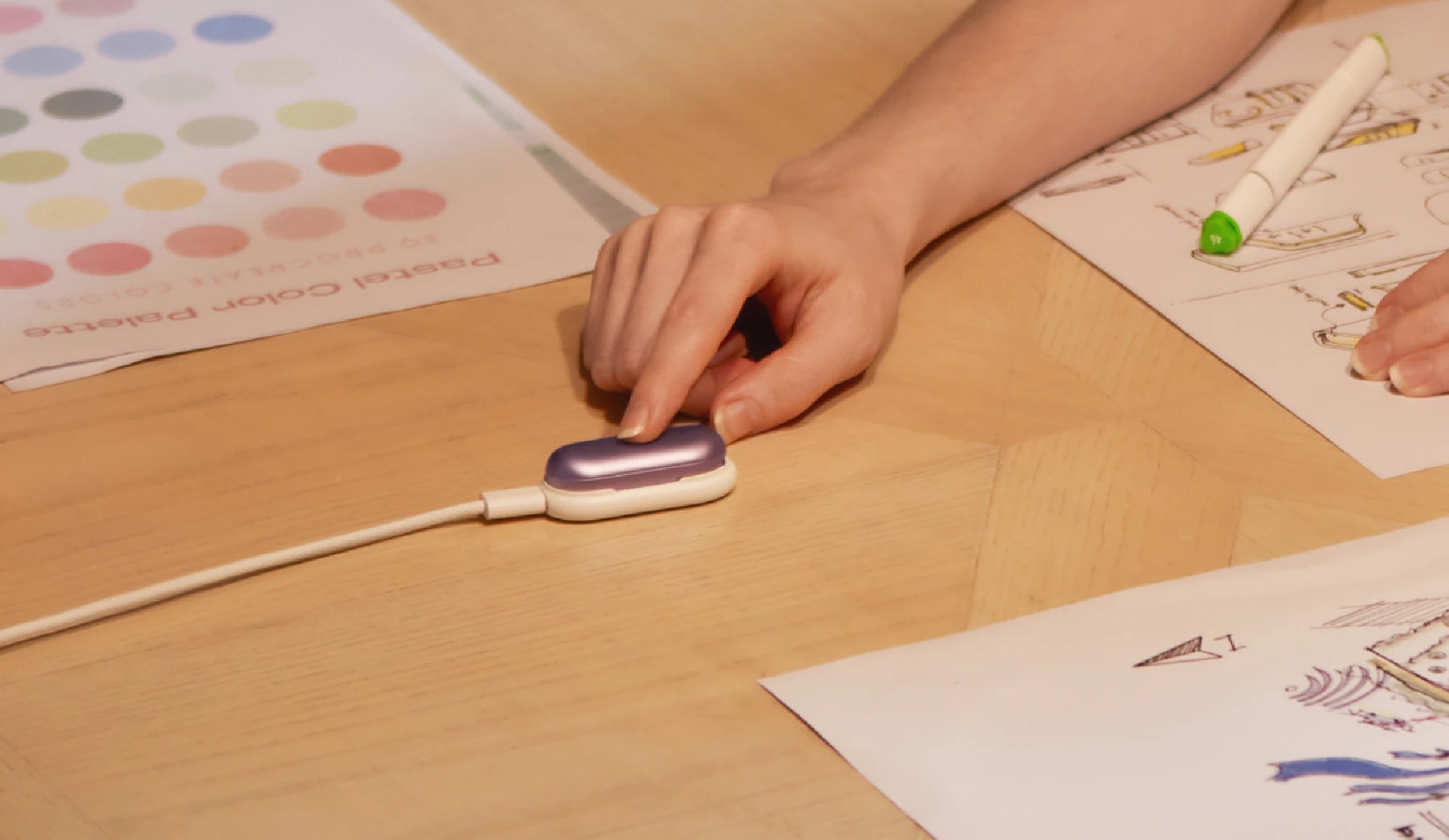
No more missed moments in meetings
With one press, Plaud NotePin S instantly starts recording with premium audio, so you capture every word with ease.


Highlight key moments with a short press
Plaud highlights the moment instantly, signaling to AI what matters most and achieving real-time human–AI alignment so insights remain accurate, actionable, and aligned with your intent.

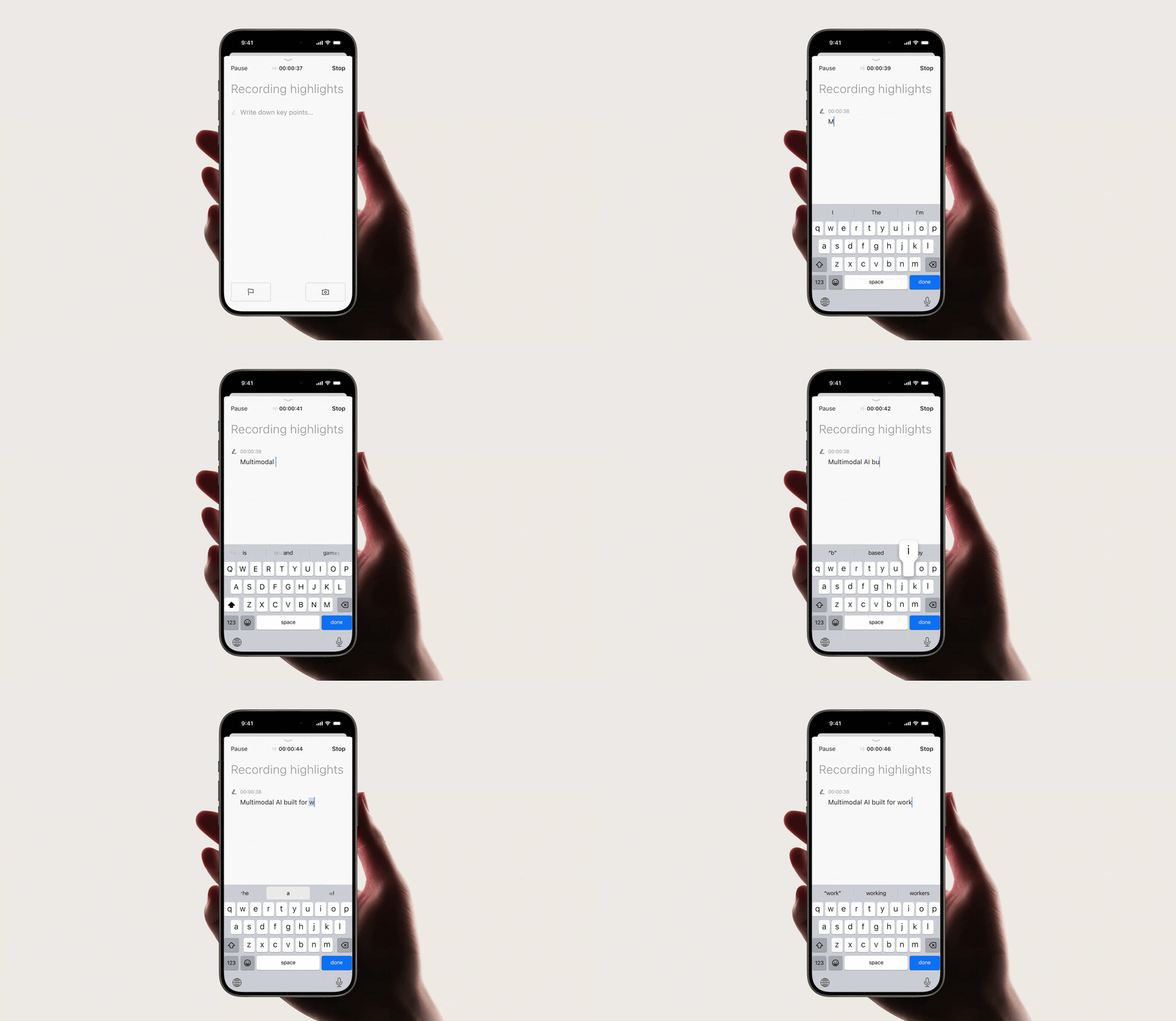
Type in key points that come to your mind
Your text notes are instantly added to the context, so summaries capture critical details and reflect your intent.

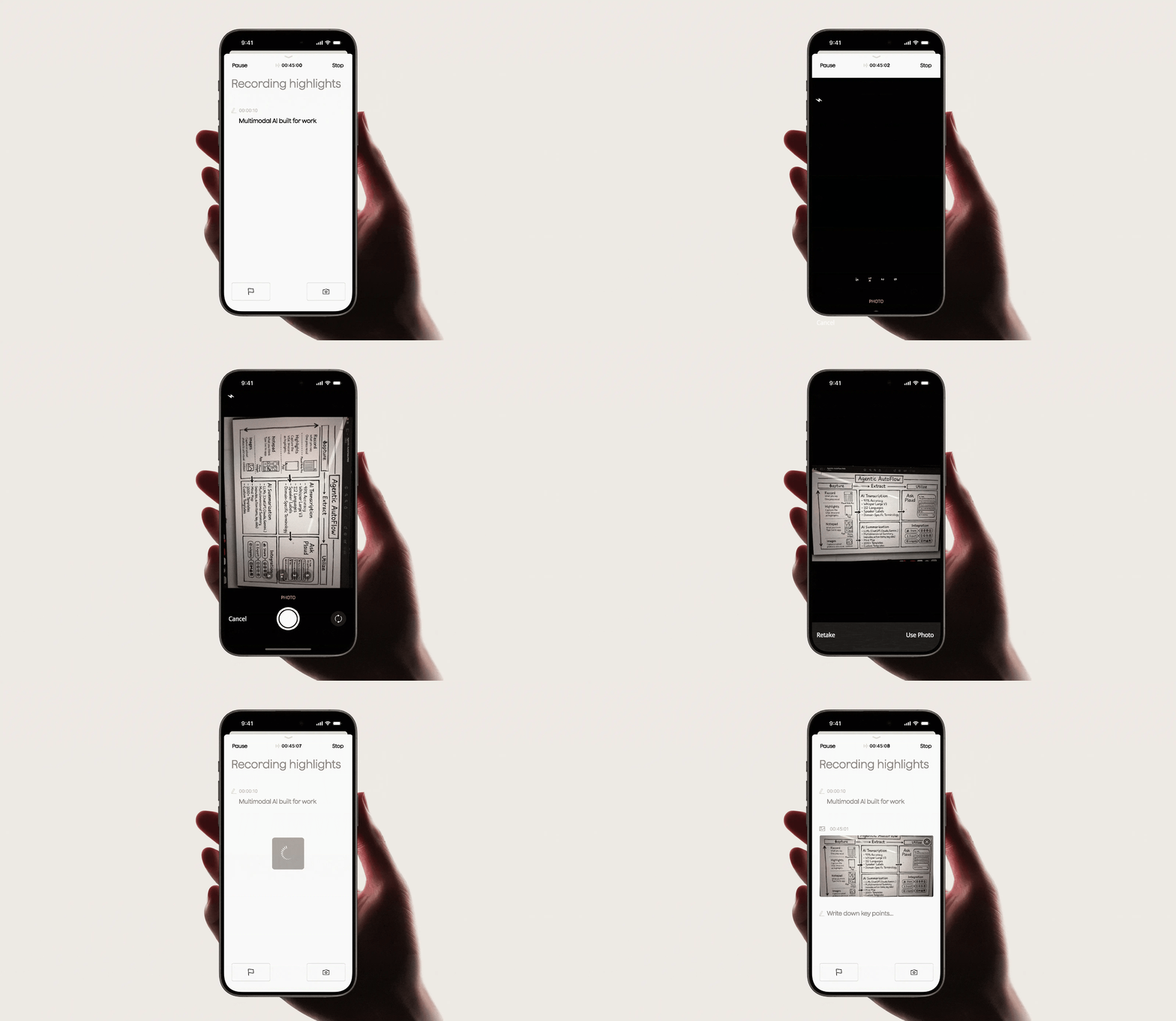
Snap a photo of what matters
Visuals combine with audio, text, and highlights to form a richer context. Resulting in more comprehensive summaries and a deeper understanding of every conversation.
-
Long press to start recording
No more missed moments in meetings
With one press, Plaud NotePin S instantly starts recording with premium audio, so you capture every word with ease.
-
Short press to highlight
Highlight key moments with a short press
Plaud highlights the moment instantly, signaling to AI what matters most and achieving real-time human–AI alignment so insights remain accurate, actionable, and aligned with your intent.
-
Add context with text input
Type in key points that come to your mind
Your text notes are instantly added to the context, so summaries capture critical details and reflect your intent.
-
Enrich context with visuals
Snap a photo of what matters
Visuals combine with audio, text, and highlights to form a richer context. Resulting in more comprehensive summaries and a deeper understanding of every conversation.
AI-powered transcription
Reliable transcripts, no matter who speaks or in what language


Industry-leading accuracy in any language
Get highly accurate transcripts in 112 languages with speaker diarization, custom vocabulary, and automatic formatting.

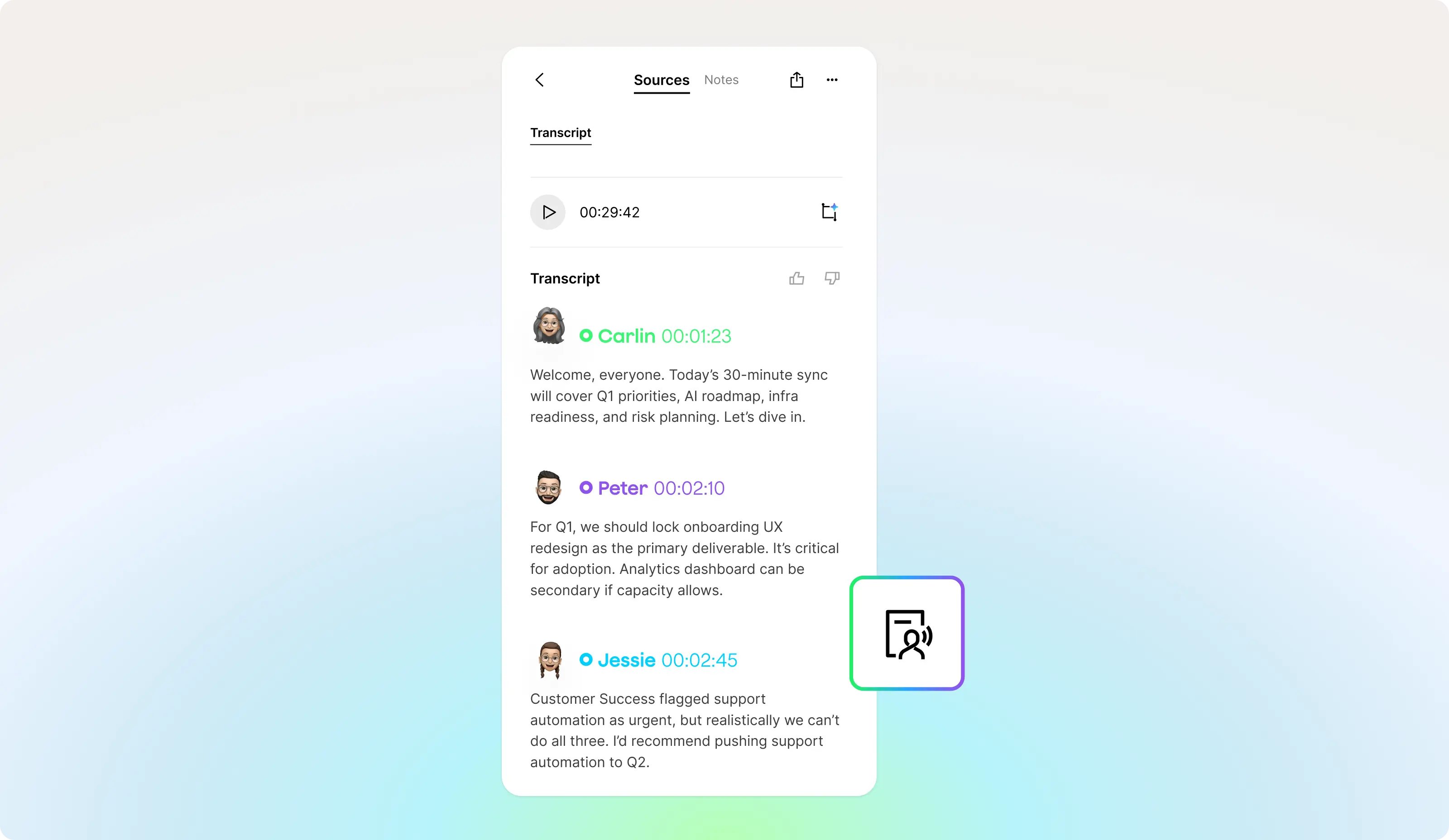
Know who said what
Speaker labels keep every conversation organized, so you always know who said what.

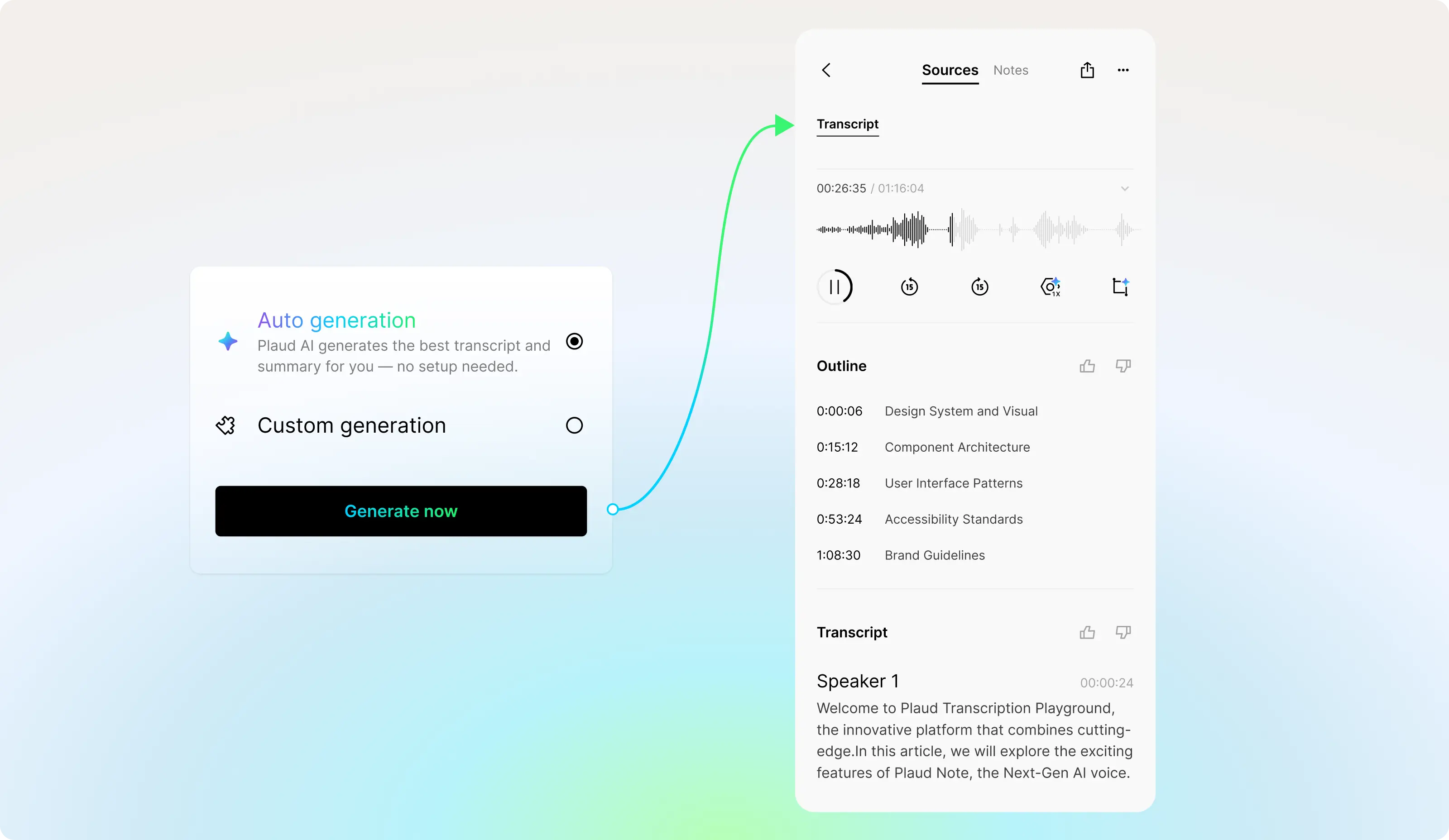
Instant language and speaker detection
With Auto Generation, Plaud automatically generates with smart detection of the language and speakers, providing accurate transcripts seamlessly.


Tailored to your industry and terminology
Choose from 10+ built-in glossaries for industries like medical, legal, finance, and more. Plaud prioritizes glossary-matched terms, even with similar pronunciations, so your transcripts remain accurate and aligned with your field.
-
Transcription in 112 languages
Industry-leading accuracy in every language
Get highly accurate transcripts in 112 languages with speaker diarization, custom glossary, and auto-formatting.
-
Speaker labels
Know who said what
Speaker labels keep every conversation organized so you always know who said what.
-
Auto-generation
Instant language and speaker detection
With the Auto-Generation feature, Plaud intelligently detects language and speakers, automatically generating accurate transcripts and presenting them seamlessly.
-
Custom glossary
Tailored to your industry and terminology
Choose from over 10 built-in glossaries for industries including medical, legal, finance, and more. Plaud prioritizes glossary-matched terms even if they have similar pronunciations, ensuring your transcripts remain accurate and aligned with your field.
Multidimensional summaries
One conversation. Endless perspectives.

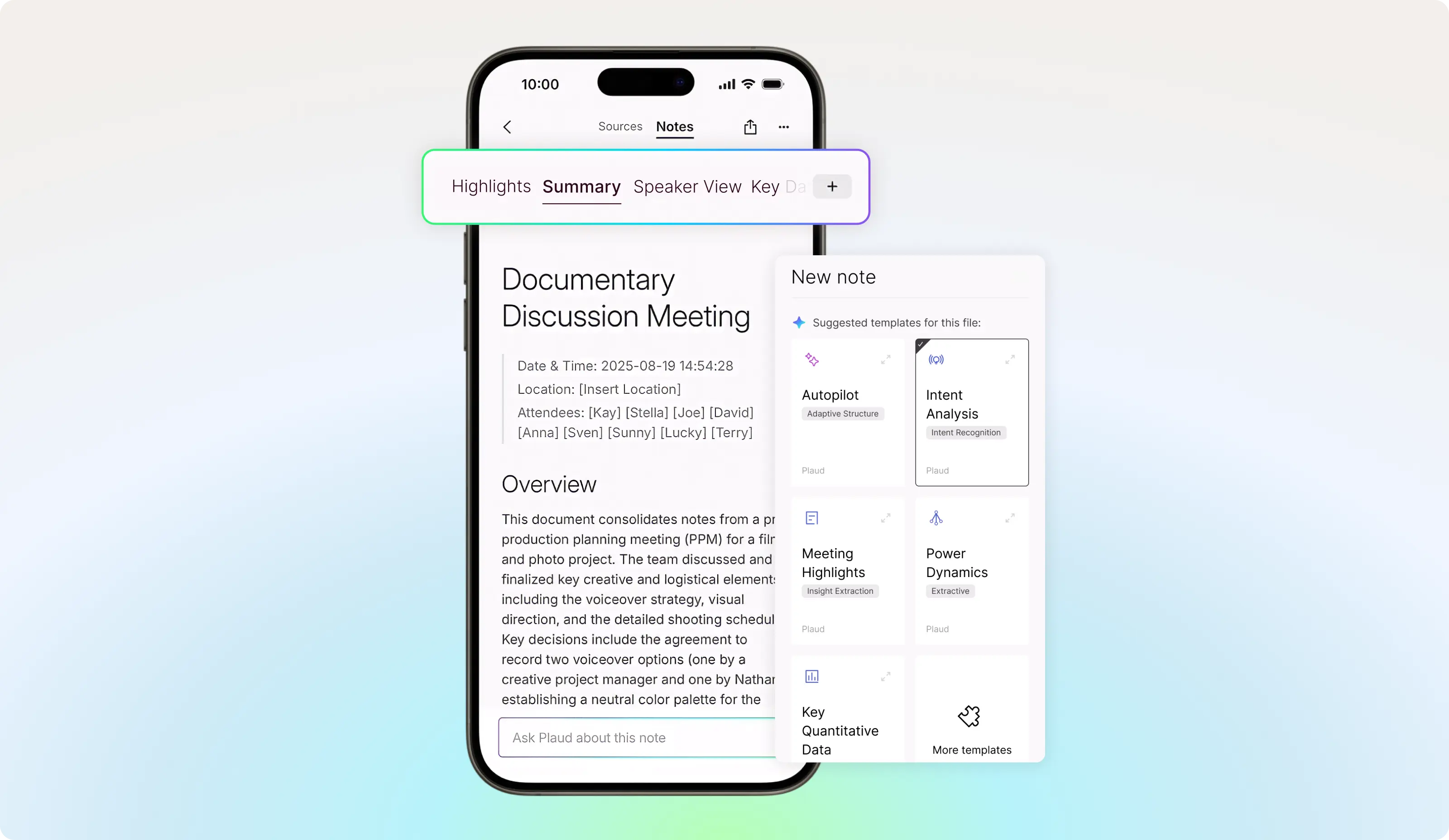
See conversations from a different perspective
Generate multiple summaries from one conversation automatically. Multidimensional summaries deliver role-specific outputs such as action items for sales, feedback for teams, and strategic overviews for leadership.

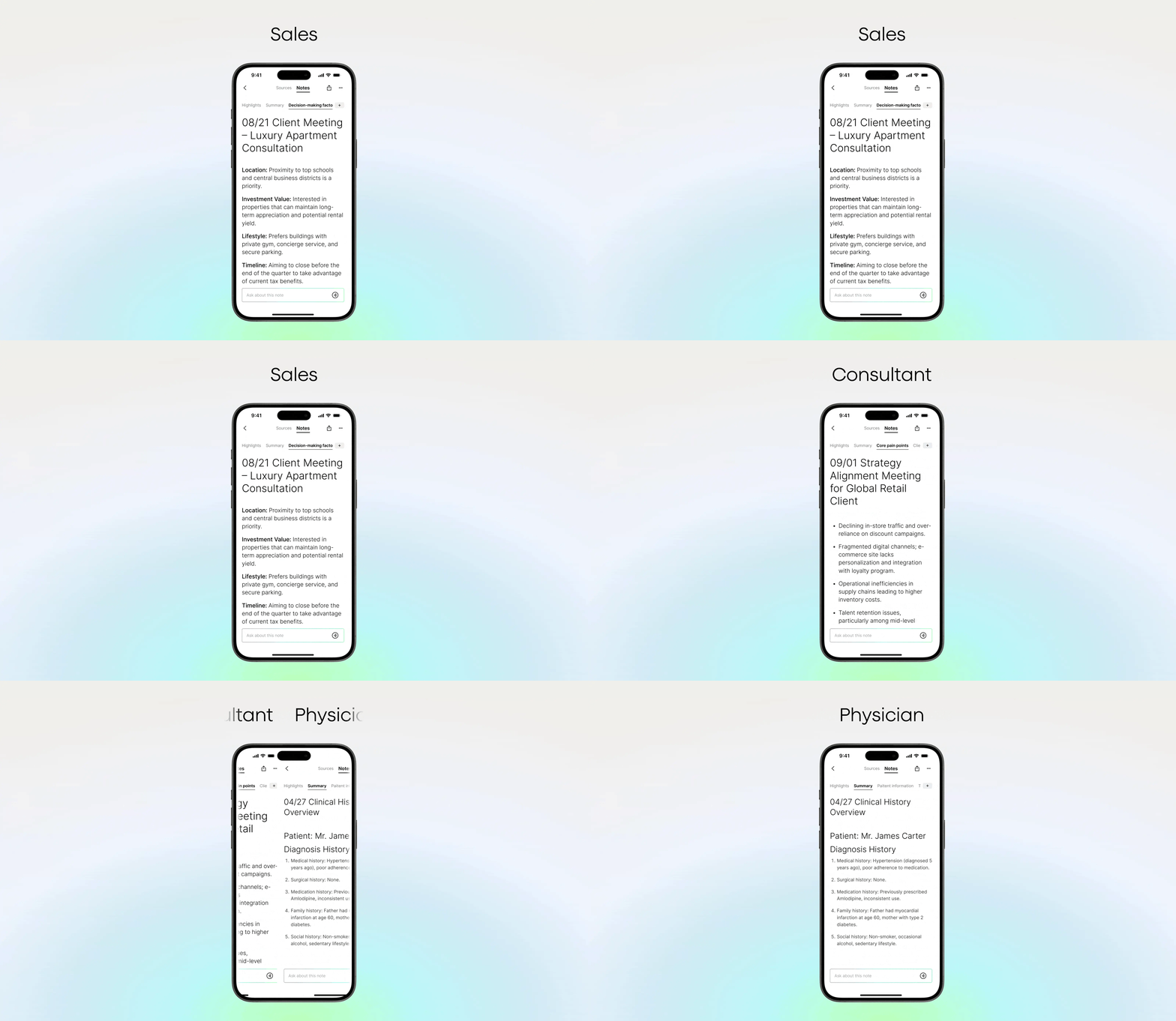
Smart summaries tailored to your role and industry
Plaud Intelligence analyzes context, understands your role, and dynamically generates summaries beyond static templates, giving you expert-level insights tailored to your work.

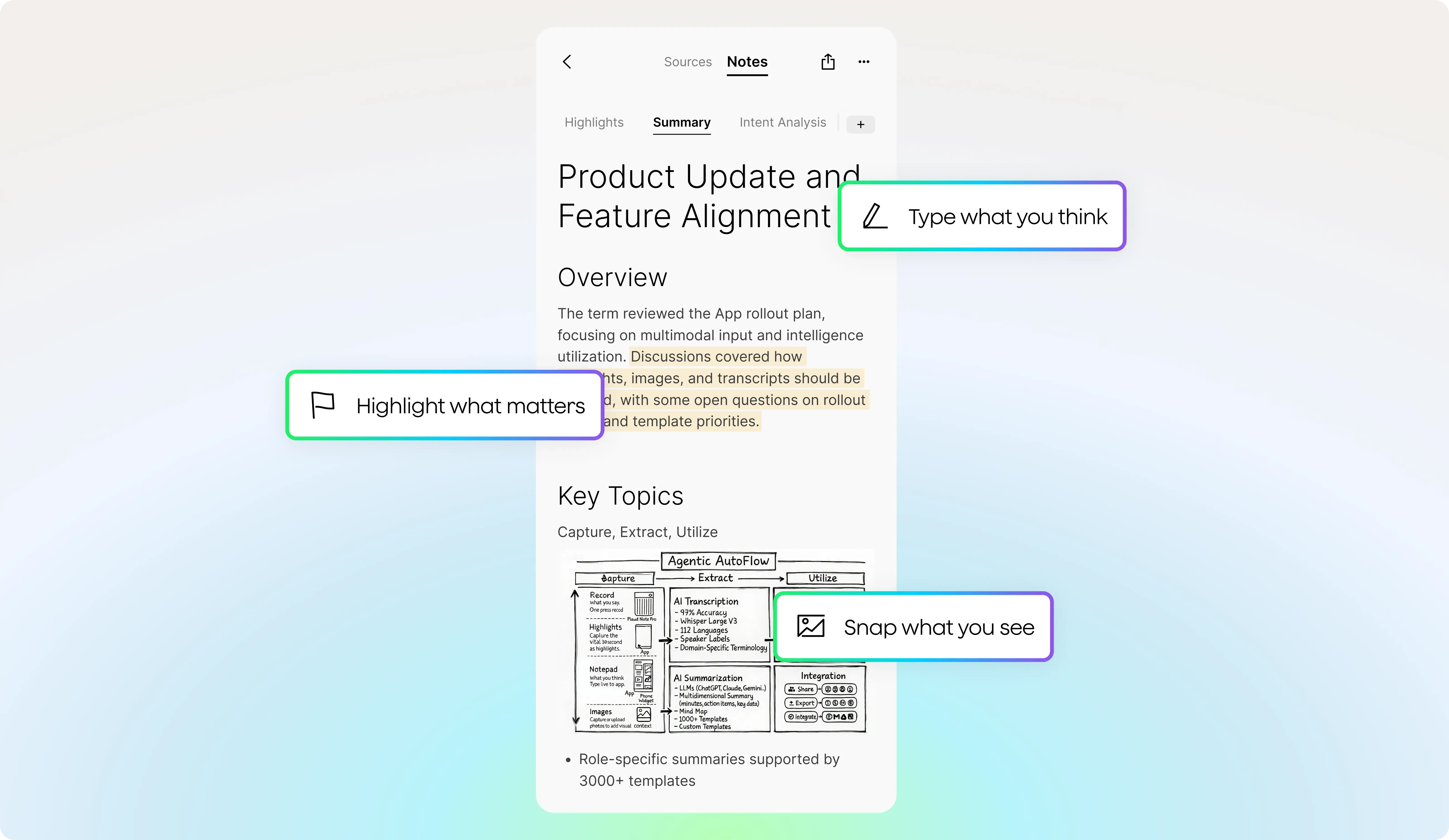
Summaries built from audio, visuals, text, and highlights
Plaud Intelligence unifies spoken words, typed notes, images, and highlights into a complete, organized summary so what matters most stands out clearly.

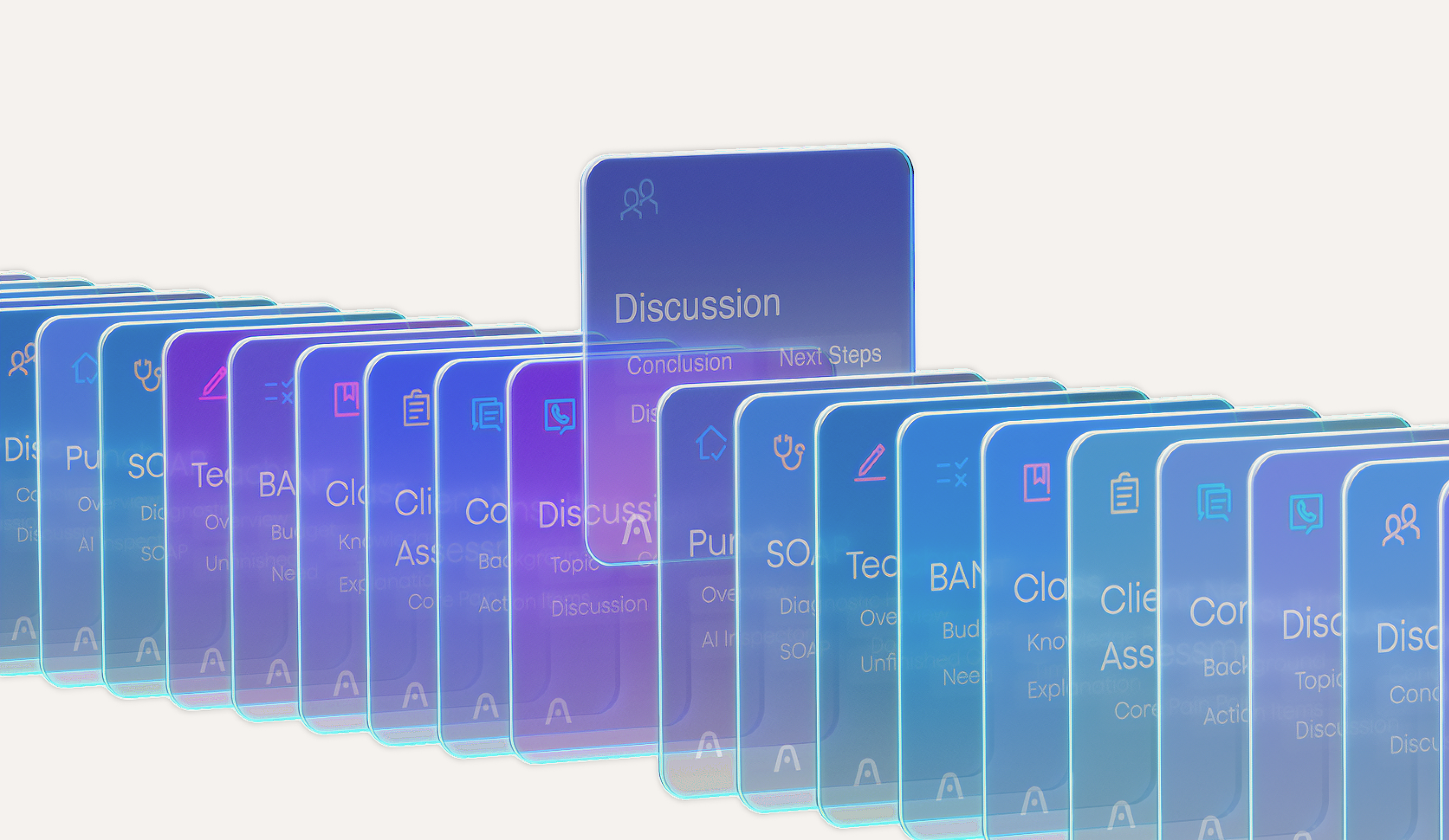
Effortlessly generate a new perspective
Access thousands of professional templates and generate multidimensional summaries that provide different perspectives while keeping your original recording intact.
-
360° Perspective
See conversations from a different perspective
Generate multiple summaries from one conversation automatically. Multidimensional summaries deliver role-specific outputs such as action items for sales, feedback for teams, and strategic overviews for leadership.
-
Personalized to your profession
Smart summaries tailored to your role and industry
Plaud Intelligence analyzes context, understands your role, and dynamically generates summaries beyond static templates, giving you expert-level insights tailored to your work.
-
Built on multimodal input
Summaries built from audio, visuals, text, and highlights
Plaud Intelligence unifies spoken words, typed notes, images, and highlights into a complete, organized summary so what matters most stands out clearly.
-
10,000+ professional summary templates
Effortlessly generate a new perspective
Access thousands of professional templates and generate multidimensional summaries that provide different perspectives while keeping your original recording intact.
Ask Plaud
Turn every question into a trustworthy answer

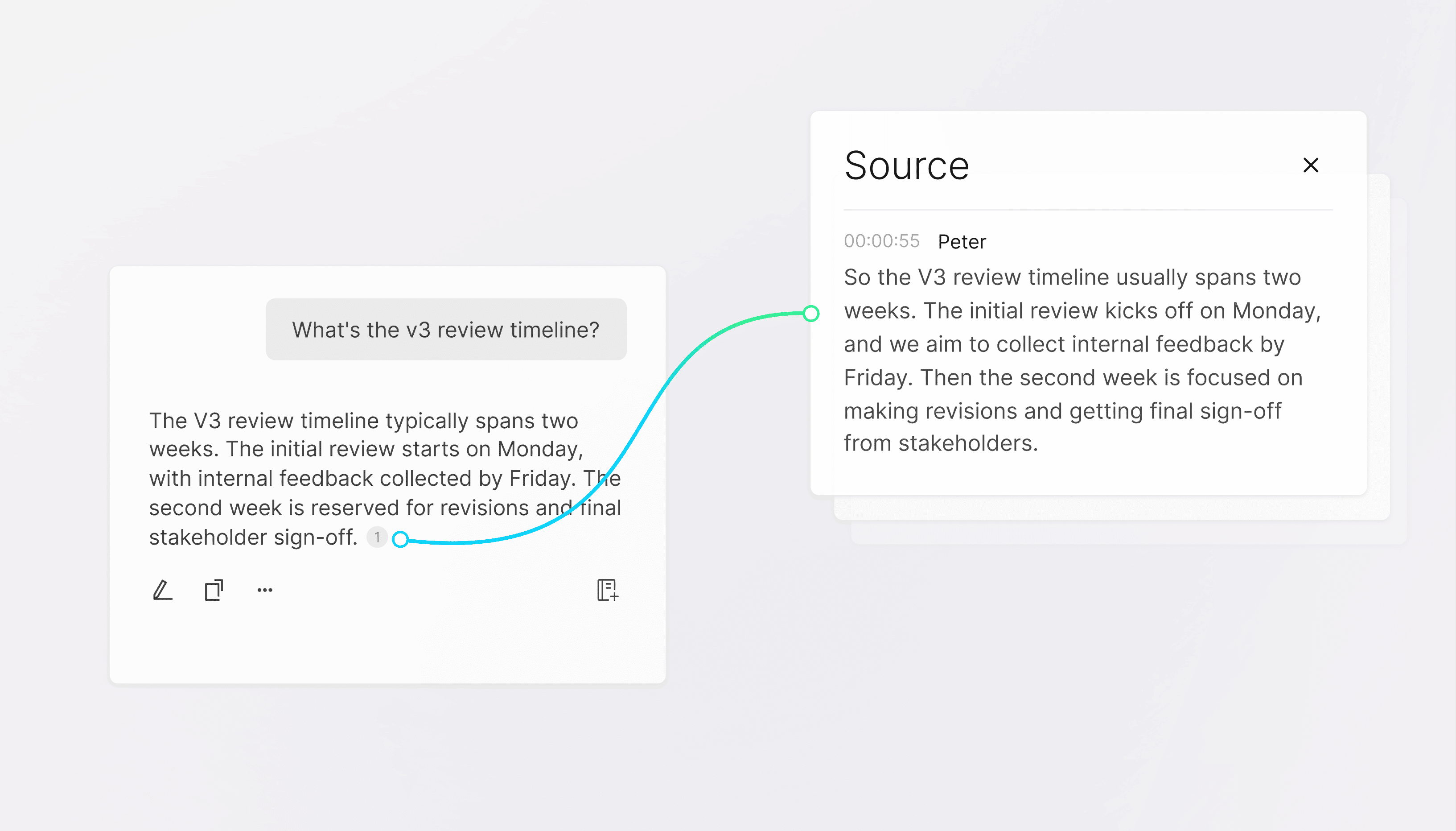
Reference-based answers
Each one is grounded in references and traceable back to your original audio, so Ask Plaud is always trustworthy and accurate.


Save answer as a note
Her biri tam bağlamıyla birlikte bir not olarak kaydedilir; bu sayede aynı konu üzerinden sürekli olarak yeni sorular sorarak konuyu geliştirebilirsiniz.


Smart suggestions
The system surfaces meaningful perspectives around your query, helping you uncover deeper insights with less effort.

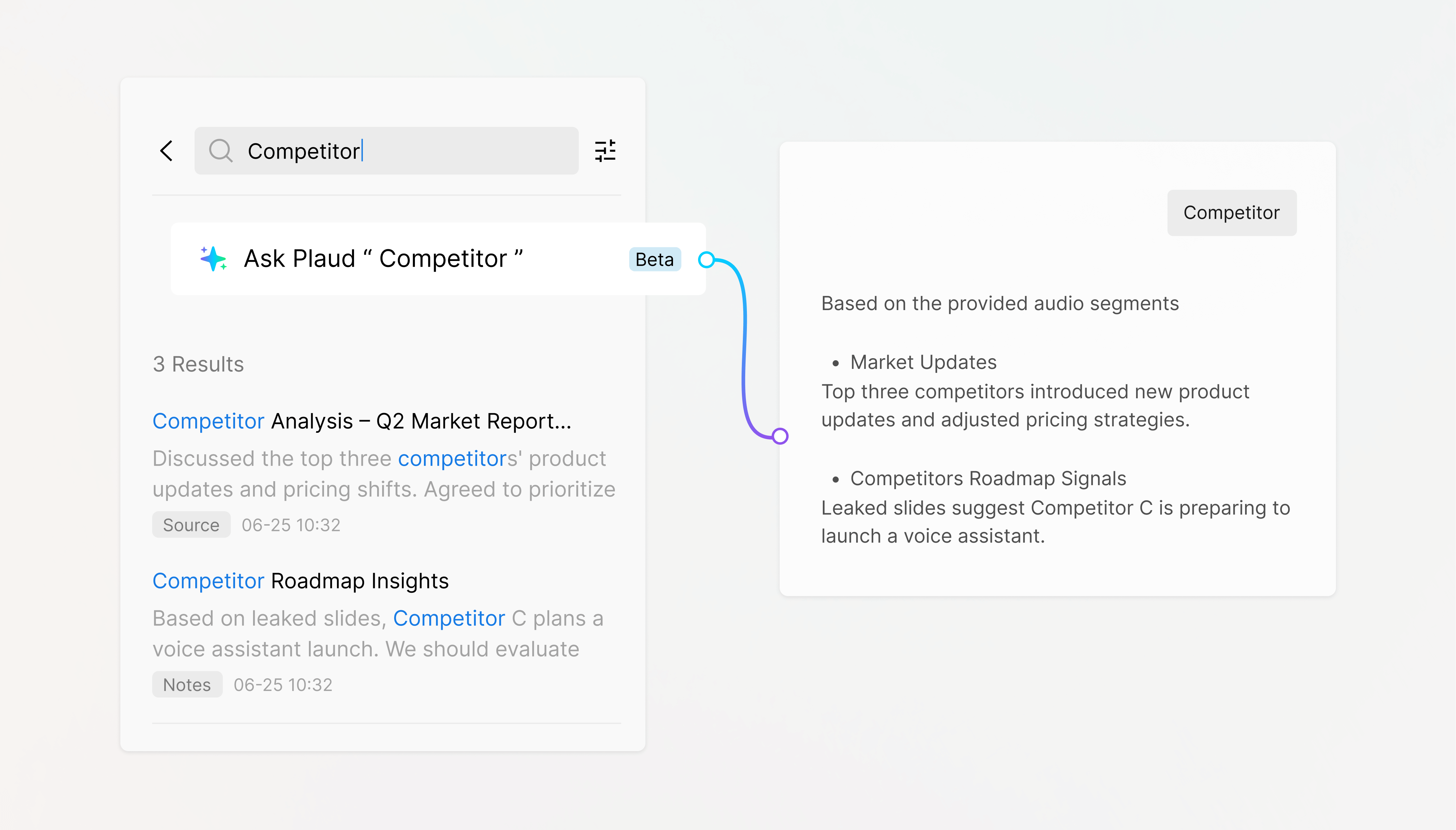
Global search
Plaud discovers patterns and causation across multiple files, giving you the intelligence to make better decisions.
-
Get answers you can trust
Reference-based answers
Each one is grounded in references and traceable back to your original audio, so Ask Plaud is always trustworthy and accurate.
-
Save answers in one go
Save answer as a note
Each one is saved as a note with full context, allowing you to build on the same thread with new questions continuously.
-
Ask one question, benefit from being guided deeper
Smart suggestions
The system surfaces meaningful perspectives around your query, helping you uncover deeper insights with less effort.
-
Query across files
Global search
Plaud discovers patterns and causation across multiple files, giving you the intelligence to make better decisions.
AI note-taker for all professionals
Expert-level insights tailored to your industry.


Accurate summaries for healthier patients
No detail should be overlooked in healthcare. Capture every word with a single press. NotePin S ensures better care and patient well-being.


Turn conversations into conversions
Details are the difference between closing the deal and not. Capture every word your client says so you can deliver exactly what they want.


Better education starts with better insights
Record, recall, and review so you can enhance your educational programs and provide post-session transcripts.


Designed to keep you on track and on time
You build, we handle your meetings. Even when offline, NotePin S captures everything, so your project stays on schedule.


1,000+ ideas & notes carried lightly
Your AI on the go is all you need. With AI power weighing about one AA battery, NotePin S goes wherever your work takes you.


Always ready to capture your next great idea
We handle the busy work, you focus on the creative. With AI-powered summaries and insights, we've removed the boring part of every job.
-
Doctor
Accurate summaries for healthier patients
No detail should be overlooked in healthcare. Capture every word with a single press. NotePin S ensures better care and patient well-being.
-
Real estate agent
Turn conversations into conversions
Details are the difference between closing the deal and not. Capture every word your client says so you can deliver exactly what they want.
-
Educator
Better education starts with better insights
Record, recall, and review so you can enhance your educational programs and provide post-session transcripts.
-
Engineer
Designed to keep you on track and on time
You build, we handle your meetings. Even when offline, NotePin S captures everything, so your project stays on schedule.
-
Digital nomad
1,000+ ideas & notes carried lightly
Your AI on the go is all you need. With AI power weighing about one AA battery, NotePin S goes wherever your work takes you.
-
Creative worker
Always ready to capture your next great idea
We handle the busy work, you focus on the creative. With AI-powered summaries and insights, we've removed the boring part of every job.
Enjoy the Free Starter Plan

Notice: Some features may not be available in all regions at launch and will be rolled out in future updates.
Privacy-focused design
Enterprise-grade security
ISO 27001
CompliantGlobally recognized standard for information security. It protects your data with strict controls ensuring confidentiality, integrity, and accessibility.
ISO 27701
CompliantGlobal privacy management standard. Ensures personal data is handled responsibly, transparently, and in compliance with GDPR.
GDPR
CompliantYour data remains under your control and is protected by one of Europe's strictest privacy laws.
SOC 2
CompliantIndependently verified systems meeting industry standards for security, availability, and confidentiality.
HIPAA
CompliantHealthcare industry-level safeguards; protects medical and personal information according to strict industry standards.
EN 18031
CompliantMeets European cybersecurity standards for secure wireless communication.
Technical Specifications
Dimensions
51.1 × 21.1 × 10.9 mmWeight
17.3 gBattery
320mAhConnectivity
BLE 5.2 / Wi-FiMicrophone
2 MEMSCharging Time
2 hoursStorage
64 GBEffective Recording Distance
Up to 3 metersSupported AI Models
GPT-5
Great all-around model for reasoning, summaries, and complex tasks.
GPT-5.2
Best for deep analysis, long context, and accurate notes with faster, reliable performance.
Gemini 2.5 Pro
Strong at understanding complex text and producing structured summaries.
Gemini 3.1 Pro ●
Great for advanced reasoning, long-context recall, and multimodal understanding.
Claude Sonnet 4.6 ●
Advanced reasoning with enhanced capabilities.
Claude Sonnet 4.5
Excellent for nuanced reasoning and high-quality text comprehension.
1. Do I need to get consent before recording with Plaud devices or apps/Web?
Generally, yes.
Before you use any Plaud device, software, program or app for recording, it is your responsibility to inform all participants and obtain any legally required consents. Recording and privacy requirements vary by country, state, and specific scenario.
However, there can be exceptions. Laws in some jurisdictions do not require the consent of all parties to a recording. Moreover, even in jurisdictions where all-party consent is generally required, certain exceptions may apply. For example, in California, consent may not be required if the conversation takes place in a public area where participants could reasonably expect to be overheard or recorded by others.
Please consult with your legal counsel for advice.
You should:
- Confirm the locations of all participants and review applicable recording and privacy regulations.
- Clearly notify everyone that the conversation or meeting will be recorded, if laws require.
- If any participant is in a jurisdiction requiring all-party consent, ensure you obtain consent from all participants before recording.
- Document consent appropriately when required, for example, a written acknowledgment at the beginning of the meeting.
Disclaimer: This information is provided for general reference only and does not constitute legal advice. Please consult a competent attorney for guidance tailored to your specific situation.
2. Does Plaud obtain recording consent on my behalf?
No.
Plaud provides the tools for recording, but it does not determine the legality of your recordings or collect consent from participants on your behalf. It is entirely your responsibility to comply with applicable laws and obtain any necessary permissions.
You should:
- Review the recording and consent laws in your location and the locations of all participants.
- Clearly inform participants that a recording will be made.
- Obtain consent before recording and document it where necessary.
- Seek legal advice if you are unsure of your obligations.
Disclaimer: This information is provided for general reference only and does not constitute legal advice. Please consult a competent attorney for guidance tailored to your specific situation.
3. How do I properly notify others before recording?
Clearly state to participants that you plan to record, specify the purpose where relevant, and ensure they explicitly agree before proceeding.
For example, you should inform them that:
- A recording will be made using a Plaud device or app.
- The recording may be used for note-taking, documentation, or another stated purpose.
- They have the option to decline or opt out of being recorded.
If you receive affirmative consent, acknowledge it verbally at the start of the conversation or in writing when required. In regulated environments, keep a record of when and how consent was given. If you receive objections, you should not record the voice of the person who objects to your recording.
Disclaimer: This information is provided for general reference only and does not constitute legal advice. Please consult a competent attorney for guidance tailored to your specific situation.
4. What should I do if I'm unsure about local recording laws?
When in doubt, err on the side of caution.
You should:
- Obtain consent from all participants before recording.
- Hold off on recording until you can confirm the laws in each participant's location.
- Seek guidance from your legal counsel or compliance team.
- Keep a record of your decision-making process and any consents you obtain.
Disclaimer: This information is provided for general reference only and does not constitute legal advice. Please consult a competent attorney for guidance tailored to your specific situation.
5. Why is it important to ask for consent before recording?
Asking for consent protects privacy, builds trust, and helps you meet legal requirements.
It's important because:
- Legal: Many jurisdictions require you to inform and gain permission from participants before recording.
- Ethical: People have a right to know they are being recorded and to understand the purpose.
- Operational: A clear consent process reduces misunderstandings and supports proper record-keeping and compliance procedures.
A simple and practical approach is to start each meeting with a brief request for consent and to make a note of the response.
Disclaimer: This information is provided for general reference only and does not constitute legal advice. Please consult a competent attorney for guidance tailored to your specific situation.
6. What happens if I record without obtaining consent?
Recording without obtaining necessary consent can expose you to serious legal risks, compliance violations, and reputational damage.
Potential consequences include:
- Legal penalties or civil liability depending on the laws in each participant's location.
- The recording being inadmissible in legal proceedings or compliance matters.
- Reputational damage and violation of internal policies or corporate guidelines.
If this situation has already occurred:
- Immediately cease recording and evaluate whether consent can be obtained retroactively.
- Consult your legal or compliance team before sharing, storing, or using the recording.
- If advised, securely delete the recording and document the corrective steps taken.
Disclaimer: This information is provided for general reference only and does not constitute legal advice. Please consult a competent attorney for guidance tailored to your specific situation.